
Interactive Presentations
Presenters can control slides, videos, documents and multimedia content directly from the touch screen.


Explore premium Digital Podium in Bangladesh solutions for classrooms, universities, conference rooms and corporate offices. Our Smart Digital Podium features an interactive touch screen, built-in PC, microphone and multimedia connectivity for modern teaching, training and professional presentations.
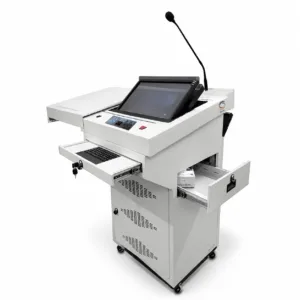
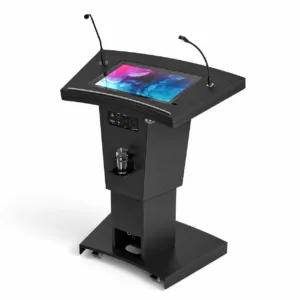
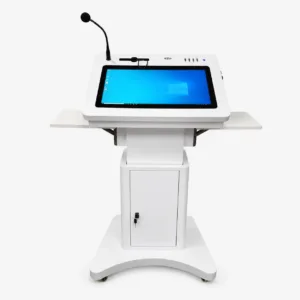
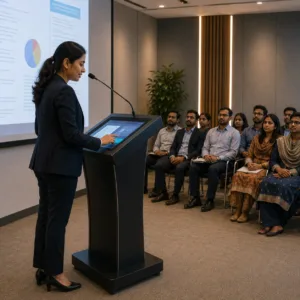
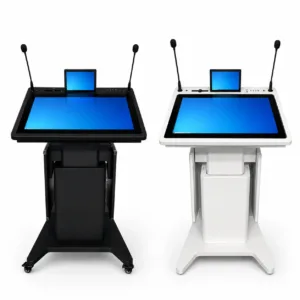
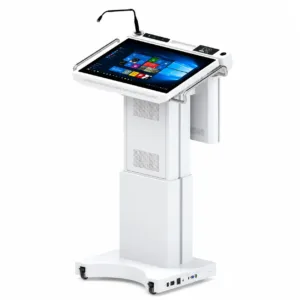
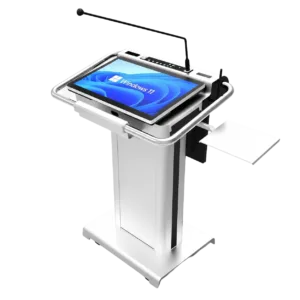
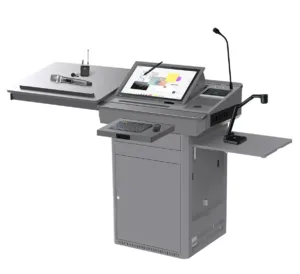
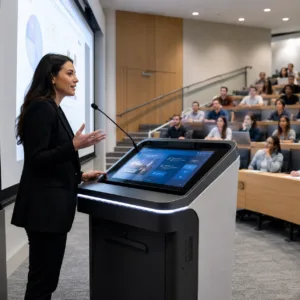
A Digital Podium is an advanced presentation lectern that combines an interactive touch screen, built-in computer, microphone, multimedia controls and multiple connectivity options in one integrated system. A Smart Digital Podium allows teachers, trainers and presenters to manage presentations, digital content and audio-visual equipment from a single convenient platform.
An Interactive Digital Podium improves teaching, training and professional presentations by making content delivery more organised, engaging and efficient.
Presenters can control slides, videos, documents and multimedia content directly from the touch screen.
The display, computer, microphone and presentation controls are integrated into one professional podium.
Visual content, live annotation and multimedia tools help maintain audience attention and improve communication.
Users can open, edit, share and present digital files without operating multiple separate devices.
A modern digital lectern creates a clean and organised presentation environment for education and business.
Wireless sharing and multimedia connectivity support interactive teaching, meetings and group collaboration.
Different types of Digital Podium in Bangladesh are available based on operating system, display size, application and presentation requirements.
An all-in-one podium with touch display, built-in PC, microphone and multimedia presentation controls.
Designed for live annotation, interactive teaching and direct control of digital presentation content.
Ideal for schools, colleges, universities, training centres and smart classroom environments.
Suitable for conference rooms, seminar halls, corporate meetings and government presentation spaces.
Provides desktop software compatibility, advanced presentation tools and easy integration with office applications.
Offers a simple interface, fast operation and access to Android-based presentation and communication applications.
A modern Touch Screen Digital Podium includes the essential hardware, software and connectivity features required for seamless presentations.
A Digital Podium is widely used in educational, government and corporate environments where interactive teaching, multimedia presentations and professional communication are required. Modern Smart Digital Podium solutions allow presenters to manage digital content, audio and connected display systems from one integrated platform.
Supports multimedia lessons, digital content delivery and interactive classroom presentations.
Ideal for lecture halls, smart classrooms, faculty training and academic presentations.
Enables organised presentations, video conferencing and efficient control of audio-visual equipment.
Suitable for business meetings, product demonstrations, training sessions and executive presentations.
Provides a reliable presentation solution for meetings, briefings, public programmes and official events.
Helps speakers manage microphones, presentation slides, videos and large display systems from the podium.
Improves professional training through interactive content, demonstrations and multimedia learning materials.
Creates a professional setup for seminars, workshops, conferences and institutional programmes.
A Digital Podium integrates computing, audio, presentation controls and multimedia connectivity into one system. A traditional podium mainly functions as a physical lectern with limited technology integration.
| Comparison | Digital Podium | Traditional Podium |
|---|---|---|
| Interactive Touch Screen | ✓ Available | ✕ Not available |
| Built-in Computer | ✓ Supported | ✕ External device required |
| Multimedia Presentation | Integrated audio, video and presentation control | Limited presentation capability |
| Internet Connectivity | Wi-Fi and LAN connectivity available | Usually not available |
| Wireless Content Sharing | ✓ Supported | ✕ Not supported |
| Audio-Visual Integration | Supports displays, projectors and sound systems | Requires separate equipment |
| Best Use | Smart classrooms, conferences and professional presentations | Basic speeches and conventional presentations |
Before purchasing a Digital Podium in Bangladesh, compare the display size, touch technology, operating system, computer configuration, connectivity, microphone system and after-sales support. The selected model should match the requirements of your classroom, conference room, training centre or auditorium.
Choose a touch display that provides comfortable navigation and sufficient workspace for presentations.
A responsive multi-touch display provides smoother annotation, navigation and interactive content control.
Select Windows, Android or dual operating system support based on software and presentation requirements.
Check the processor, RAM and storage capacity for smooth operation of presentation and conferencing software.
Ensure the podium includes HDMI, USB, LAN, Wi-Fi, Bluetooth and required audio input and output ports.
Look for an integrated gooseneck microphone and compatibility with wired or wireless microphones.
Check compatibility with interactive flat panels, projectors, LED displays, conference systems and PA systems.
Select a supplier that provides installation, user training, warranty and reliable after-sales support.
The following table presents common specifications of a Smart Digital Podium. Exact configurations may vary depending on the product model, display size and project requirements.
| Specification | Typical Configuration |
|---|---|
| Touch Display | 15.6-inch, 21.5-inch or model-dependent interactive display |
| Touch Technology | Capacitive or infrared multi-touch technology |
| Operating System | Windows, Android or dual operating system |
| Processor | Intel Core i3, Core i5, Core i7 or equivalent |
| Memory | 4GB, 8GB, 16GB RAM or higher |
| Storage | 128GB, 256GB or 512GB SSD |
| Microphone | Gooseneck microphone with optional wireless microphone |
| Connectivity | HDMI, USB, audio I/O, LAN, Wi-Fi and Bluetooth |
| External Display Support | Projector, interactive flat panel, LED display or monitor |
| Audio Support | Built-in speaker or external PA system connectivity |
| Body Material | Durable metal or premium engineered podium structure |
| Applications | Classroom, conference room, auditorium, training and corporate use |
Product configuration and technical specifications may vary by model. Review the individual product page or request a quotation for the exact specification.
Choose Mugnee for reliable Digital Podium in Bangladesh solutions with quality products, professional installation and dependable after-sales support. Our Smart Digital Podium systems are suitable for schools, universities, conference rooms, auditoriums, government organisations and corporate offices.
Durable and reliable Digital Podium systems designed for regular educational, corporate and professional use.
Our technical team provides installation, system configuration and testing for smooth and dependable operation.
Practical user training helps teachers, presenters and staff operate the digital podium confidently and efficiently.
Receive technical assistance, troubleshooting and maintenance support whenever your organisation requires it.
Our Digital Podium solutions include warranty support for greater reliability and long-term investment protection.
Product delivery, installation and technical services are available for projects throughout Bangladesh.
We recommend suitable podium configurations based on room size, application, technical requirements and project budget.
We serve educational institutions, government organisations and corporate clients with dependable presentation technology solutions.
Find answers about Digital Podium price in Bangladesh, connectivity, operating systems, installation, warranty, customization and technical support before selecting a suitable podium for your educational institution or organisation.
The Digital Podium price in Bangladesh depends on the touch-screen size, processor, RAM, storage, operating system, microphone, connectivity and additional AV equipment. Contact Mugnee with your required specifications to receive an accurate and current quotation.
Many Smart Digital Podium models include a built-in computer with a processor, RAM and SSD storage. The exact configuration may vary by model, and selected podiums can also support an external computer or OPS-based PC.
Yes. A Digital Podium can connect to an Interactive Flat Panel through HDMI, USB, LAN or supported wireless connectivity. This allows the presenter to display lessons, documents, videos and annotations on a larger interactive screen.
Yes. Compatible Digital Podiums can send presentation content to an LED Display, projector, monitor or video wall through HDMI or other supported video outputs. Additional controllers or converters may be required for some display systems.
Yes. Depending on the selected model and audio setup, a Digital Podium can support a built-in gooseneck microphone, wired microphone and wireless microphone system. It can also connect to an external amplifier or PA System.
Yes. A Digital Podium can be integrated with a Conference System, PA System, video conferencing equipment, projector, Interactive Flat Panel and room control devices to create a complete professional presentation environment.
Digital Podiums are commonly available with Windows, Android or dual operating system support. Windows is suitable for desktop software and office applications, while Android provides fast access to common presentation and multimedia functions.
A typical Digital Podium may include a touch-screen display, built-in computer, gooseneck microphone, speakers, HDMI and USB ports, network connectivity and presentation controls. Included components vary depending on the selected model and project scope.
Yes. The podium configuration may be customised according to the required display size, computer specification, operating system, microphone, connectivity, branding and integration with existing classroom or conference room equipment.
Yes. Mugnee provides Digital Podium delivery, installation, configuration and system testing for educational institutions, government organisations and corporate projects across Bangladesh, subject to project location and service scope.
User orientation or operational training can be provided after installation. The training helps teachers, presenters and authorised staff understand the touch display, computer, microphone, external display connection and presentation controls.
Warranty coverage depends on the Digital Podium model, manufacturer and supplied components. Mugnee also provides technical consultation, troubleshooting and after-sales support according to the applicable warranty and service terms.
Contact Mugnee Multiple Limited Today!
📞 Call: +8801711-927445
Get a Free Consultation & Custom Quotation
Upgrade your classroom, conference room or auditorium with a reliable Smart Digital Podium designed for interactive presentations, professional communication and seamless AV control.