

LED Display Builder

How LED Displays Work: A Complete Guide for Beginners
LED displays are widely used in shopping malls, corporate offices, conference rooms, control rooms, outdoor billboards, events, schools, and commercial advertising. This guide explains how an LED display system works from content source to final screen output.
What Is an LED Display?
An LED display is a digital screen made with thousands or millions of light-emitting diodes. These tiny LEDs work together to show images, videos, graphics, and text. Each LED module contains many red, green, and blue LEDs. By controlling the brightness of these three colors, the display creates clear and colorful visual content.
Unlike a standard LCD screen, an LED display is built from modular panels. This makes it suitable for large video walls, outdoor advertising boards, conference room displays, stage backgrounds, digital signage, and customized commercial display solutions.
Signal Flow
- Content Source
- Video Processor with Built-in Sending Card
- CAT6 / Fiber Cable
- Receiving Card
- LED Module
- LED Display Output
Power Flow
- AC 220V Input
- Power Supply
- DC 5V Output
- Receiving Card
- LED Module
How Does an LED Display Work?
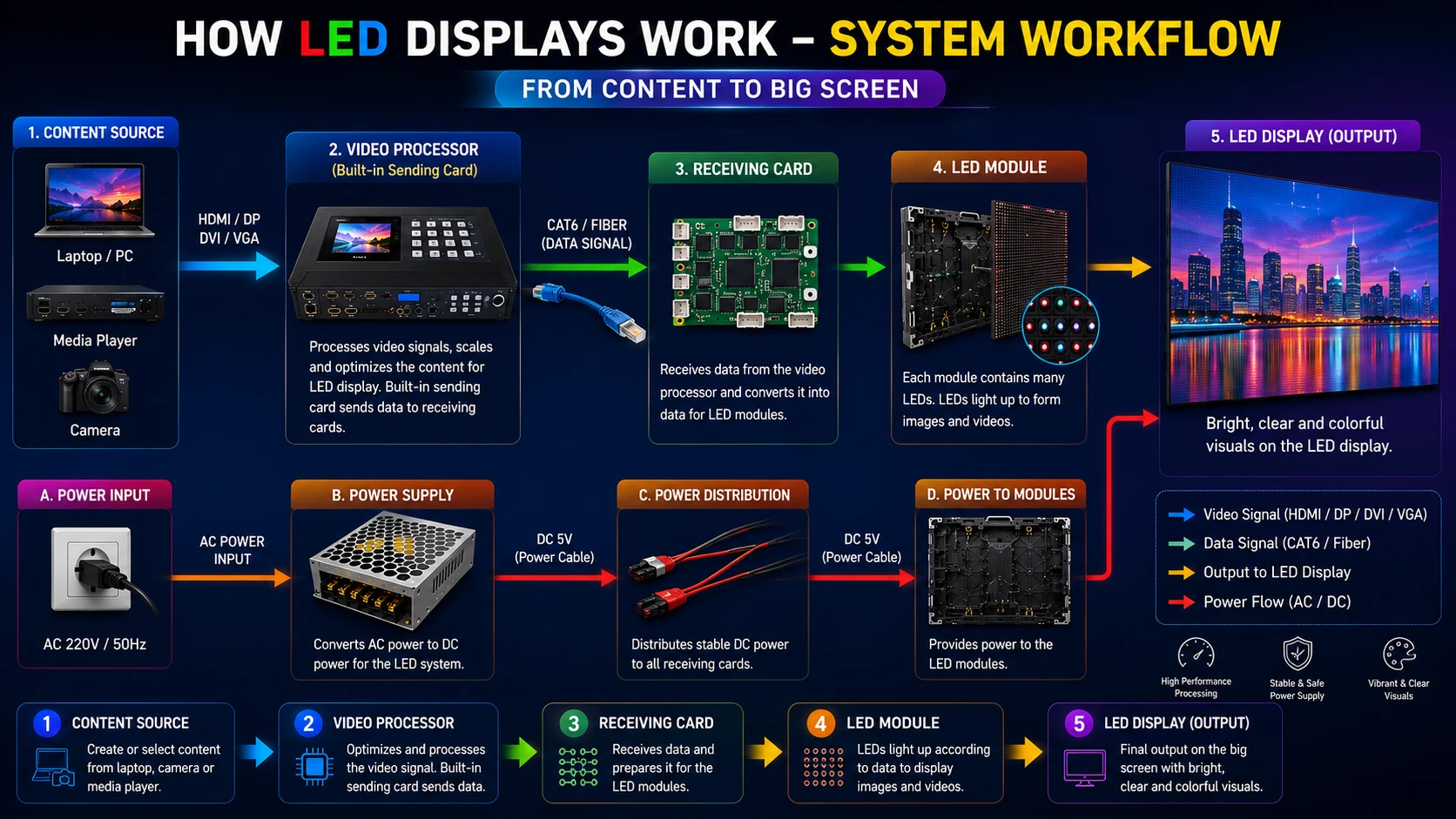
An LED Display works by receiving video content from a laptop, desktop computer, media player, camera, or digital signage software. The video processor receives the input signal, adjusts the resolution, scales the image, and sends optimized display data to the receiving card through CAT6 or fiber cable. The receiving card then distributes the data to LED modules, and the modules light up to create the final image.
Step-by-Step LED Display Workflow
1. Content Source
The content source can be a laptop, desktop PC, media player, camera, or signage software. It provides the original video, image, advertisement, presentation, or live feed.
2. Video Processor
The video processor receives HDMI, DisplayPort, DVI, VGA, or SDI input. It scales the image, processes the signal, adjusts brightness, and sends optimized data to the LED system.
3. Data Transmission
Processed video data is transmitted through CAT6 or fiber cable. CAT6 is common for short and medium distance, while fiber is better for long-distance installations.
4. Receiving Card
The receiving card receives data from the video processor and controls the connected LED modules. It ensures each module shows the correct image section.
5. LED Module
LED modules contain RGB LEDs arranged in a pixel matrix. These LEDs light up at high speed to create images, videos, animations, and text.
6. Display Output
After data reaches the LED modules, the screen shows the final visual output such as advertising content, live video, presentation, or digital signage.
Main Components of an LED Display System
LED Module
Displays images, videos, graphics, and text. It is the visible part of the LED display and directly affects image quality.
LED Cabinet
Holds LED modules, power supplies, receiving cards, and internal wiring. It provides structure, alignment, and protection.
Video Processor
Processes video signals, scales resolution, manages display layout, and sends optimized data to the LED display system.
Receiving Card
Receives processed display data and controls LED modules so each module shows the correct image section.
Power Supply
Converts AC power into stable DC power and provides the required voltage for modules and control components.
CAT6 / Fiber Cable
Transfers data from the video processor to receiving cards and helps keep display communication stable.
Signal Flow vs Power Flow
Signal flow and power flow are separate parts of an LED display system. Signal flow carries video data, while power flow supplies electricity to the LED modules, receiving cards, and other internal components.
Signal Flow Path
- Content Source
- Video Processor
- CAT6 / Fiber Cable
- Receiving Card
- LED Module
Power Flow Path
- AC 220V Input
- Power Supply
- DC 5V Output
- Receiving Card
- LED Module
Why Is a Video Processor Important?
A video processor is one of the most important parts of a modern LED display system. It receives video signals from different input sources and converts them into a format suitable for the LED screen. It also adjusts resolution, manages scaling, controls image layout, supports multiple input sources, and improves overall display quality.
Many modern LED video processors come with a built-in sending card. In that case, a separate sending card is not required. The video processor directly sends data to the receiving cards through CAT6 or fiber cable.
How LED Modules Create Images
LED modules create images using red, green, and blue LEDs. These three colors are combined at different brightness levels to create millions of colors. Each group of LEDs works as a pixel. When thousands of pixels are controlled together, the LED display can show photos, videos, animations, live feeds, and digital signage content.
Common LED Display Workflow Problems
No Signal
This may happen due to a faulty HDMI cable, wrong input source, incorrect processor setting, or disconnected CAT6 cable.
Flickering Display
Flickering can occur because of unstable power, loose data cable, poor grounding, incorrect refresh rate, or receiving card issue.
Black Module
A black module may be caused by power supply failure, damaged ribbon cable, faulty receiving card output, or module-level problem.
Wrong Mapping
Wrong mapping usually happens when the screen configuration file is incorrect or receiving cards are not assigned properly.
Color Mismatch
Color mismatch may happen because of different module batches, incorrect calibration, wrong color settings, or aging LEDs.
Power Failure
Power failure can happen due to damaged power supply, loose power cable, voltage fluctuation, or overloaded electrical connection.
LED Display Maintenance Tips
Proper maintenance helps improve LED display performance and lifespan. Users should check power cables, CAT6 or fiber connections, ribbon cables, ventilation, cabinet alignment, receiving cards, and power supplies regularly. Dust cleaning, stable voltage, proper grounding, and professional servicing are also important for long-term reliability.
Frequently Asked Questions
How does an LED display work?
An LED display works by receiving video data from a content source, processing it through a video processor, sending it to receiving cards, and displaying it through LED modules.
Does every LED display need a video processor?
Most professional LED displays use a video processor for scaling, signal processing, and image control. Many modern processors also include a built-in sending card.
What is a receiving card in an LED display?
A receiving card receives processed data from the video processor and controls LED modules so that each module displays the correct image area.
What cables are used in LED displays?
LED displays commonly use HDMI or DisplayPort for input, CAT6 or fiber cable for data transmission, and power cables for electrical supply.
What is the difference between signal flow and power flow?
Signal flow carries video data to the LED modules, while power flow supplies electricity from AC input through power supplies to modules and receiving cards.
Need a Professional LED Display Solution?
Explore indoor LED displays, outdoor LED displays, LED video walls, commercial LED screens, and complete LED display solutions for your business.